When you rest,
your guardian thrives

FuzzyPace turns screen-time restraint into a game the whole family plays — your screen time drains a little guardian, and putting the phone down brings it back to life.

Free to start Privacy first · data stays on device Parents stay in the loop 🆕 Self contracts · Eye gym · Strength
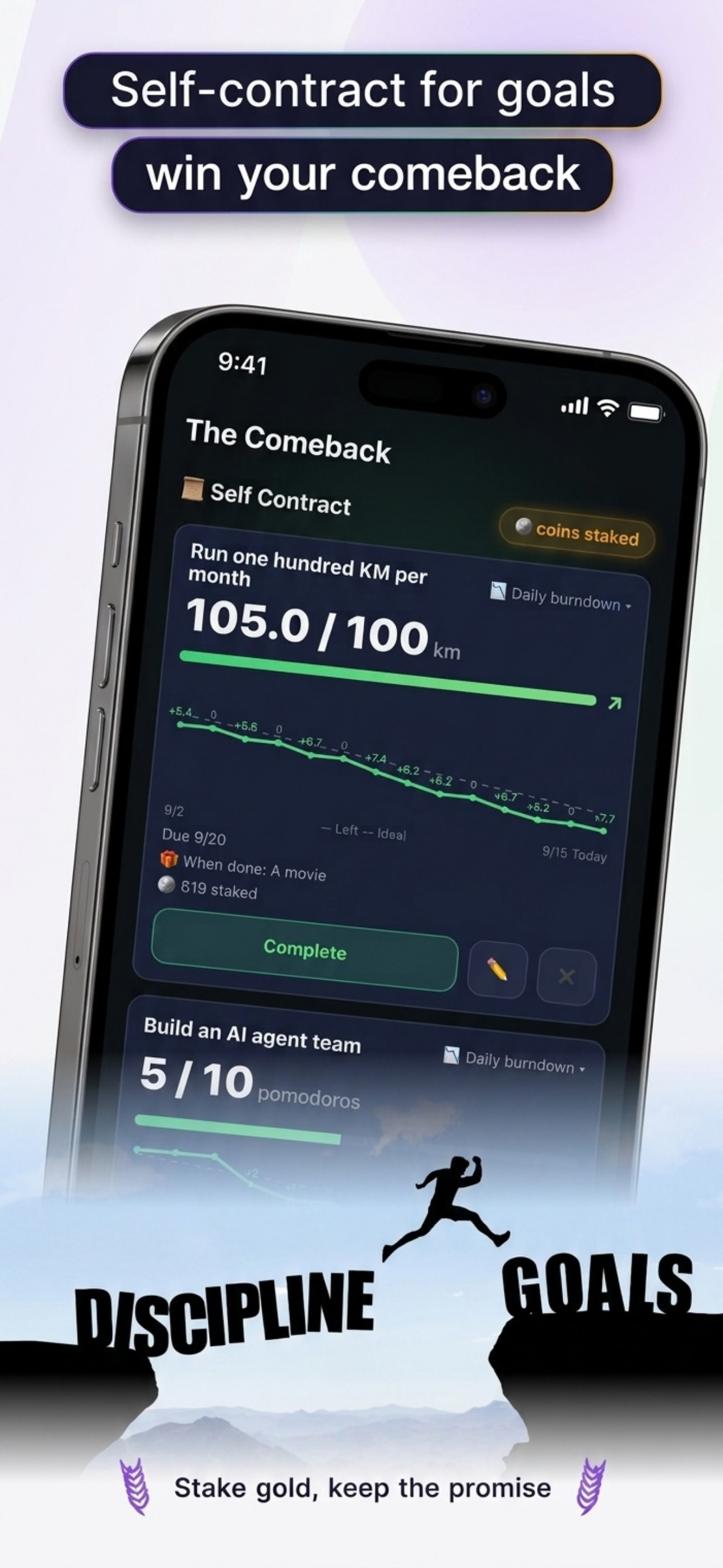
FuzzyPace self contract: run 100 km per month, 105.0 / 100 km complete

It's not just you who can't stop

Short video and infinite feeds are engineered to be addictive. Willpower talks don't work — "just five more minutes" wins every time. FuzzyPace tries a different angle: not lectures, but attachment.

✗ Life without the guardian

You look up from the feed and it's midnight. You know you should stop, but stopping gives you nothing back — no reward, only guilt. And lecturing kids about phones? Pure resistance.

✓ Life with the guardian

Every time you put the phone down, your guardian perks up instantly. Rest, walks, meditation, naps — they all recharge it. It's not a monitor watching you; it's a companion resting with you.

Three steps to a happy guardian

STEP 1

A shield between you and the feed

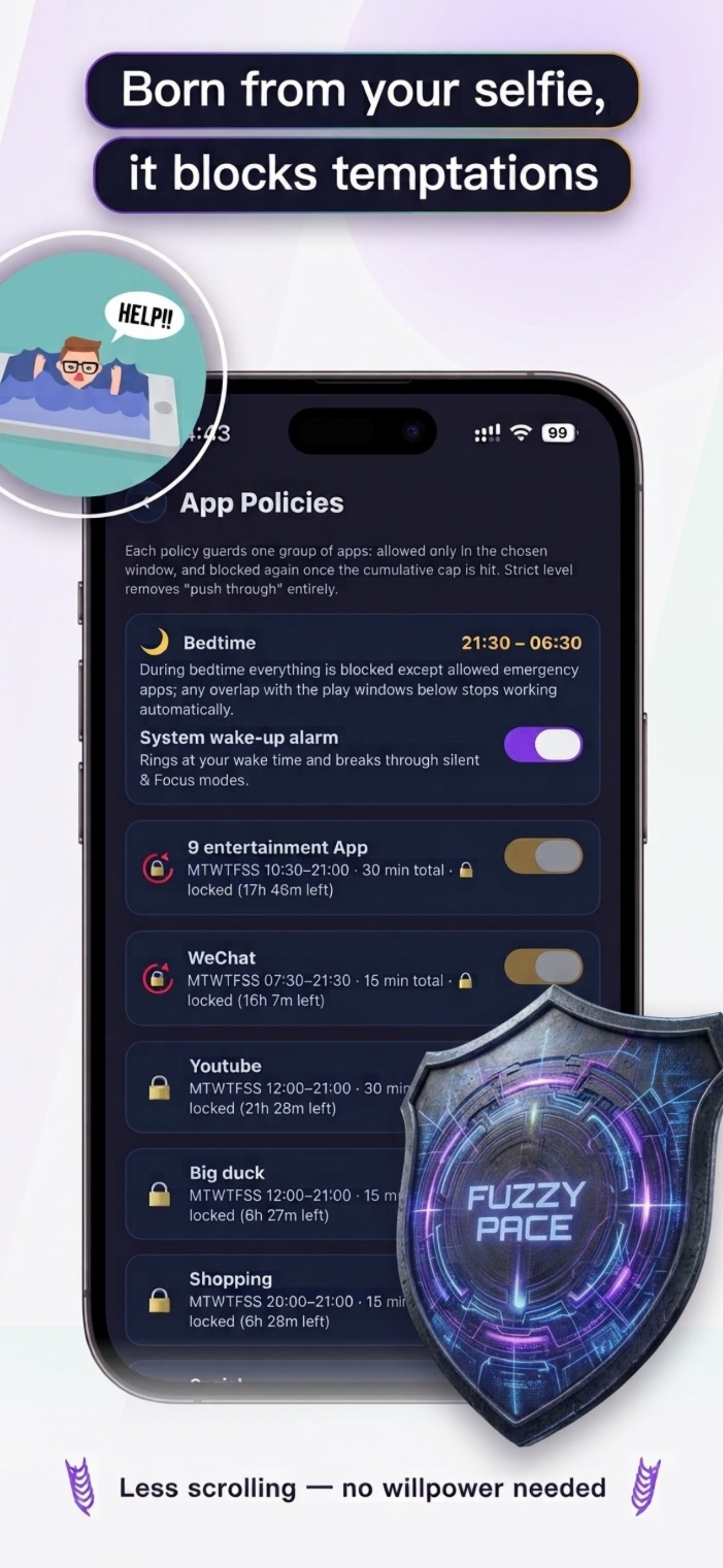
Short video and infinite feeds are engineered to be addictive, so FuzzyPace puts App Policies in the way: each group of apps gets its own schedule and daily cap — allowed only in the chosen window, and blocked again once the cap is hit. Strict level removes "push through" entirely. Less scrolling, no willpower needed.

App Policies: bedtime 21:30–06:30, entertainment and social apps with daily caps
STEP 2

Mind & Body recharges it

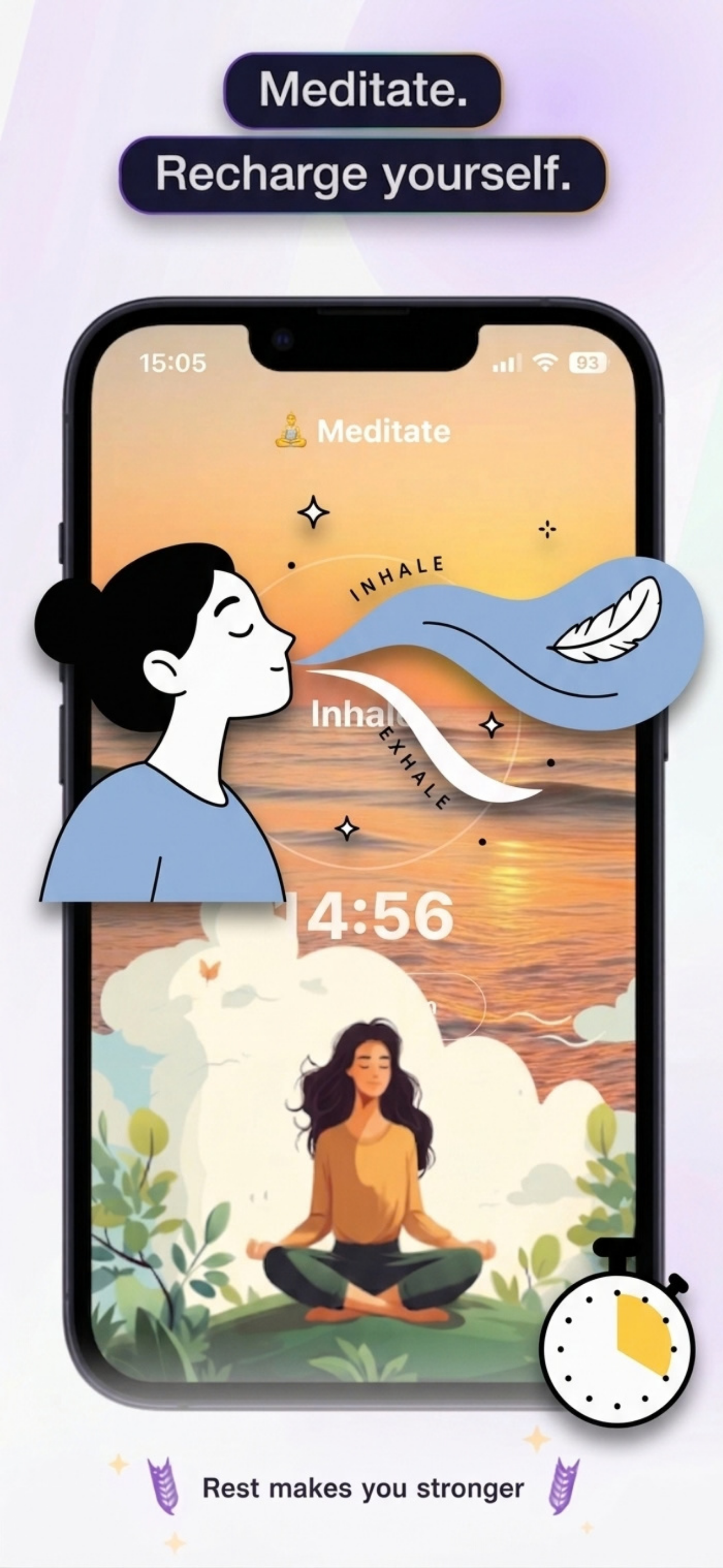
Meditation, power naps, pomodoro focus, walks outside, push-up challenges — every deliberate break restores your guardian. Tired eyes? Follow-along eye exercises tracked by the front camera, all on-device, never recorded. Scenic meditation visuals, rain sounds that keep playing with the screen off, nap quality scores — and with an Apple Watch on at night, a morning sleep report with deep/light/awake stages. Rest deserves good design too.

Meditation scene: guided breathing over a beach sunset
STEP 3

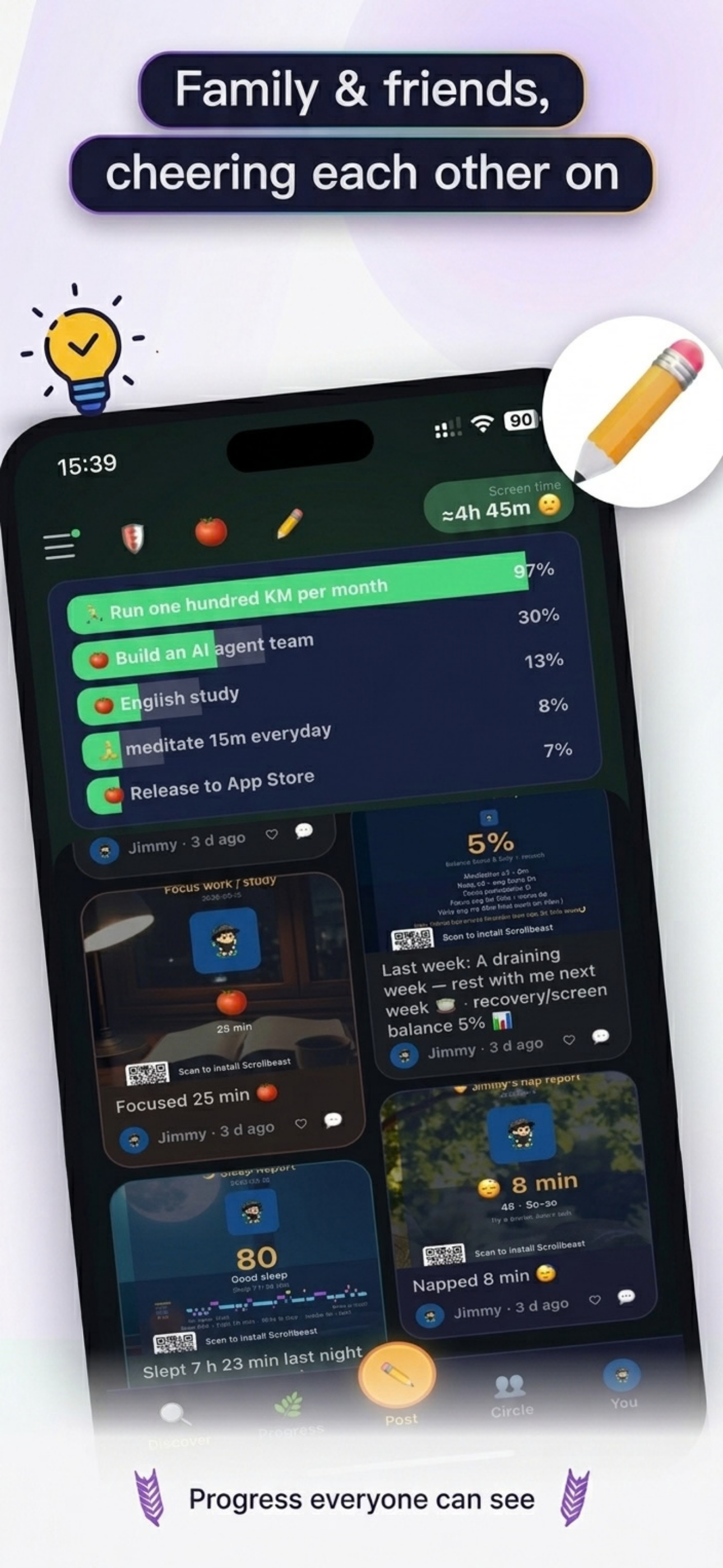
Family & friends, cheering each other on

Progress everyone can see: self-contract milestones, focus streaks, sleep scores and nap wins all become posts your circle can cheer. A weekly family report shows who's cutting screen time — and parents see totals, never which apps.

Feed: goals, focus, sleep and nap posts from family and friends
12

recovery tools — meditation, naps, walks…
one guardian notices them all

100%

of your personal data stays on device —
no ads, nothing sold

72h

is the longest anything family-shared
lives on our servers

Who lives with a guardian

👨‍👩‍👧

Families with kids

Tired of being the phone confiscator? Your child's screen-time summary flows to parents automatically, plus a weekly family report. Parents see totals — never which apps. Awareness replaces control, trust replaces resistance.

💼

Professionals

Pomodoro focus with distractions shielded, a 20-minute nap with a quality score, an after-work walk that recharges your guardian. Your personal weekly report tells you whether recovery beat consumption.

📚

Students

Turn on protection for study hours during exam week — short video apps stay shielded. Focus time grows a sense of achievement — not guilt.

Rest, done properly

What do you actually do after putting the phone down? FuzzyPace turns recovery into a complete toolkit — and your guardian notices every bit of it.

🍅

Pomodoro Focus

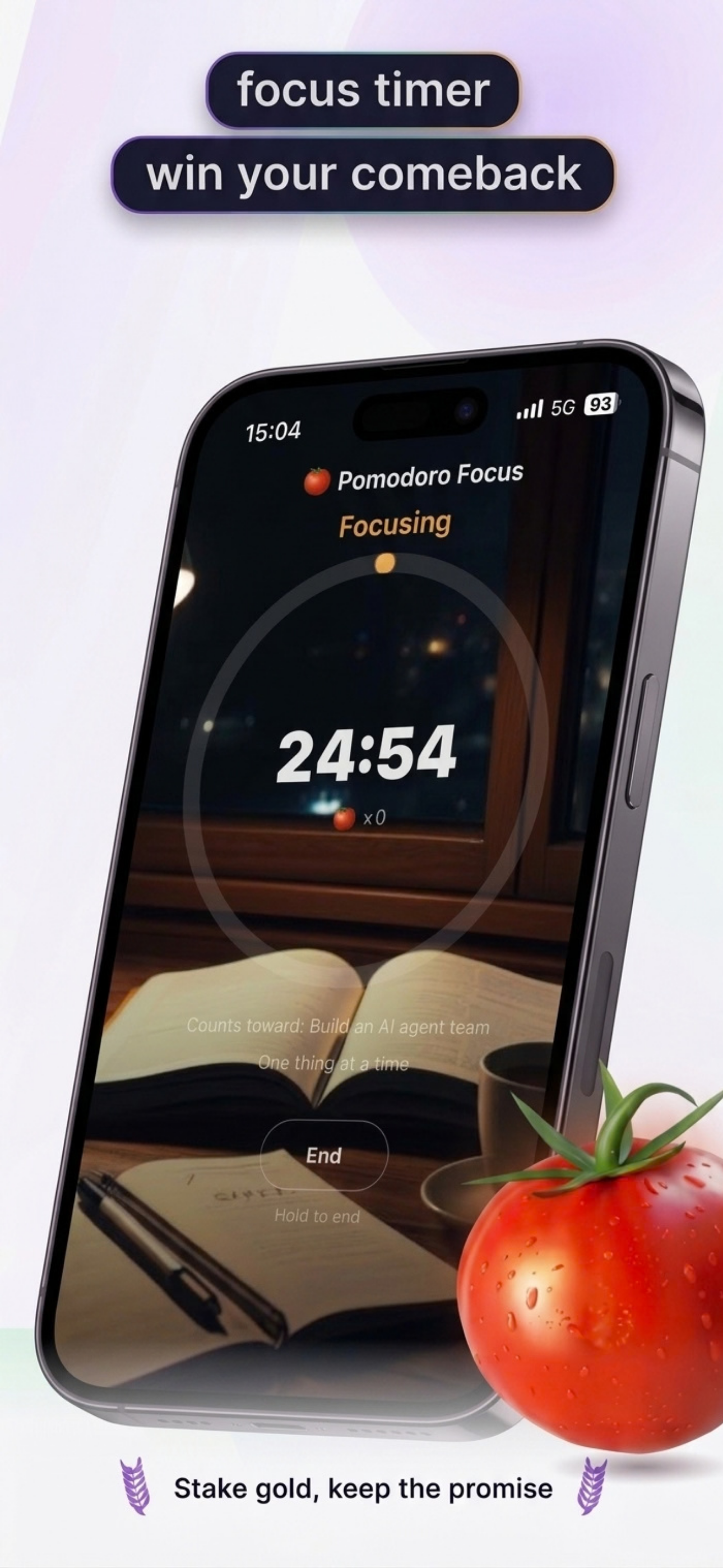
Custom focus lengths with rain, waves or forest sounds that keep playing with the screen off — then share your focus card.

🧘

Meditation Scenes

Beach sunset, moon over the sea, mountain sunrise… guided breathing with voice cues, eyes closed welcome.

😴

Power Naps

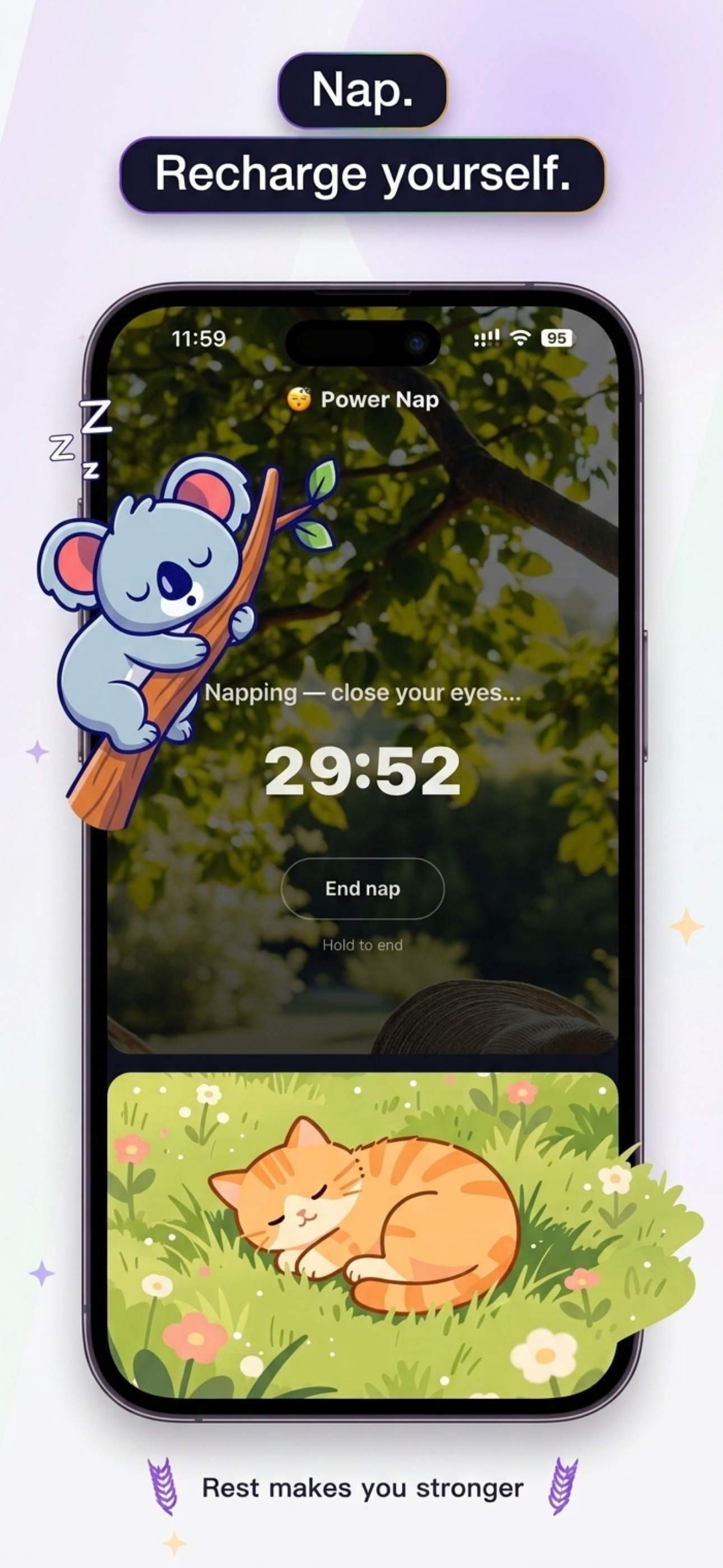
15–30 minute science-backed naps, a gentle alarm to wake you, plus a sleep quality score and history chart.

🚶

Walks & Workouts

Walk or jog with just your phone — screen off, auto-settled into your share list; Apple Watch workouts count too. One tap to post.

🖼️

Share & Memes

Multi-photo posts and guardian meme cards with the install link built in — run posts automatically carry your heart-rate curve, pace and weather.

📖

Personal Weekly

Your consumption-vs-recovery balance and 4-week trends — a private diary, for your eyes only.

🧭

Hide & Seek

Start a game with a 4-digit code and find teammates on the Dragon Radar — screen-time restraint as outdoor play.

👪

Family Watch

Screen-time summaries sync to parents automatically, plus a weekly family report — totals only, never which apps.

🪙

Coins & Guardian Shop

Meditate, walk, sleep well — every recovery earns coins (a 95-point night pays 95). Spend them on decor, armor and scepters, or full skin styles (a few free) — your guardian even gets minted onto the coins.

🏃

Training Plan

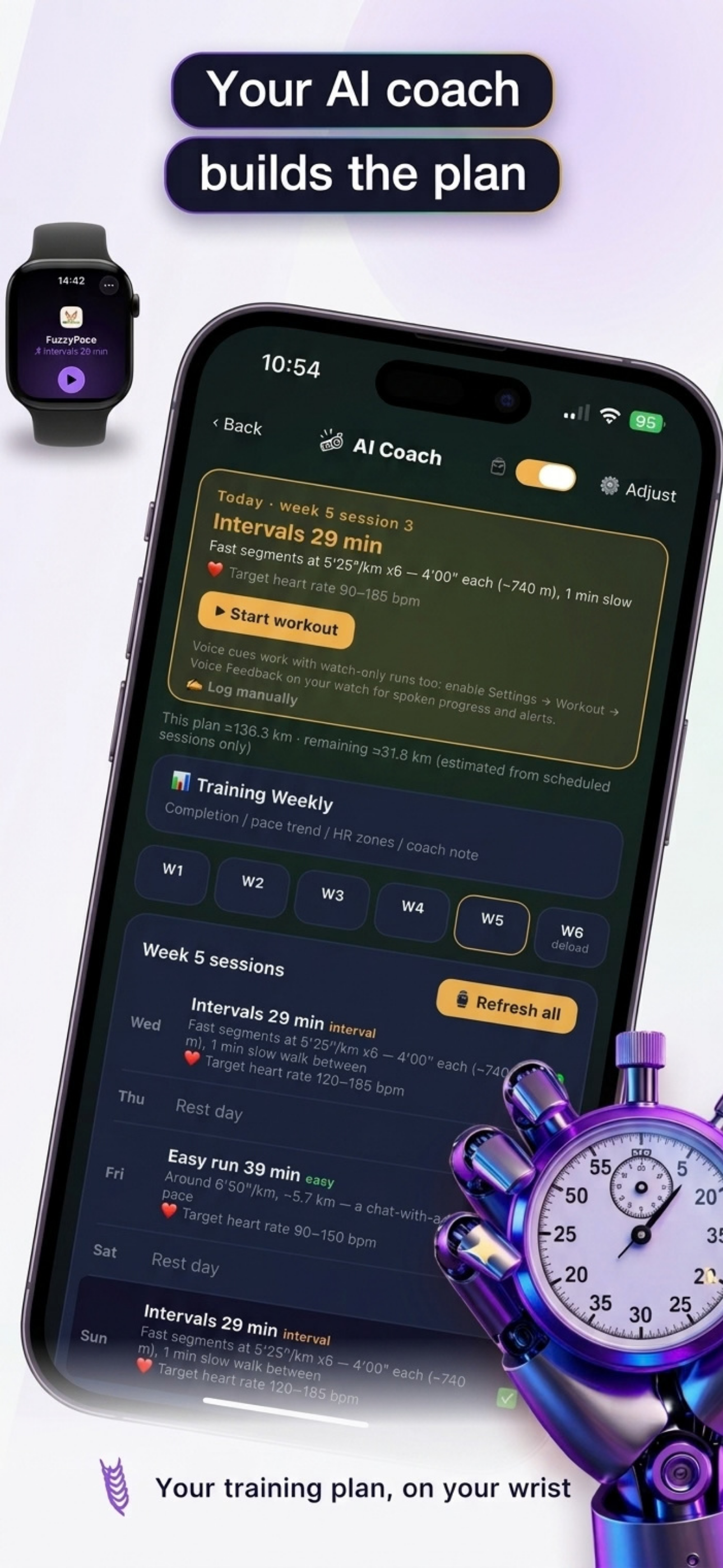
A plan built on your current pace — fat-burn, maintain or push, 3/4/5 sessions a week over 6 progressive weeks, with heart-rate review curves and a training weekly report.

💤

Sleep Report

Sleep with your Apple Watch on, wake to a stage-by-stage chart (deep / light / awake) and a sleep score.

💡

Curiosity Actions

Three 5-minute mini-actions a day matched to your interests (music, nature, science…) — finishing them earns coins.

🤝

Self Contracts NEW

Make a pact with yourself — N pomodoros, N minutes of meditation, N km of running — and stake coins on it. Finish to mint a medal; break it and the stake burns, leaving a scar.

👁️

Eye Gym NEW

The front camera tracks your gaze: look up/down/left/right, circle both ways, blink to relax — done in under a minute and counts toward today's recovery. All on-device, never recorded or uploaded.

💪

Strength Training NEW

Push-ups, squats and planks with camera-based rep counting, coach voices in three personalities, and coins for hitting your targets.

🛡️

Binge Shield NEW

Scroll past your chosen limit (15/20/30 min) and a system shield drops over your most addictive apps — stop for 5 minutes and it lifts itself.
Progress you can see

Pomodoro focus timer: 24:54 focusing
Focus timer, win your comebackStake gold, keep the promise
AI Coach training plan: week 5 interval and easy run sessions
Your AI coach builds the planYour training plan, on your wrist

Fresh from the App Store

The real screens, exactly as they ship.

Three things we won't compromise

🌱 Free first

The core experience — guardian companion, parent updates, Hide & Seek, family weekly report — is all free. Premium unlocks extra scenes and sounds; free is never a crippled version.

🔒 Privacy first

Screen time, meditation and nap history stay on your phone. Your personal weekly report is for your eyes only. Family data is end-to-end encrypted, and our servers keep nothing longer than 72 hours.

👪 Informed, not surveilled

A child's usage is shared with parents as totals only — parents never see which apps their kid uses. We believe trusted kids hold boundaries better than controlled ones.

Free to start. Premium unlocks more.

The free tier is genuinely useful. Premium unlocks every meditation scene and ambient sound — one family subscription covers everyone.

Free

$0
forever
  • Guardian companion + screen-time emoji
  • 3 meditation scenes · 3 ambient sounds
  • Hide & Seek up to 20 players · family up to 4
  • Screen-time summaries to parents
  • Self contract (1 active at a time)
  • Family weekly report
  • AI guardian creation · 3 total
  • Coins & the guardian shop
Most popular

Individual Premium

$1.99
per month · or $14.99/year
  • For users without a family group
  • All meditation scenes & ambient sounds
  • Unlimited self contracts (free: 1 at a time)
  • Full personal weekly report + share cards
  • AI guardian creation · 3/month
  • Training weekly report
  • All skin styles
  • Family size expansion (Family plan only)

Family Premium

$4.99
per month · or $39.99/year · one subscription covers the whole family
  • Everything in Free
  • All meditation scenes (incl. future ones)
  • Unlimited self contracts (free: 1 at a time)
  • All ambient sounds: fireplace, café, summer crickets…
  • No player / family size limits
  • Full personal weekly report + share cards
  • AI guardian creation · 3/month
  • Training weekly report
  • All skin styles

FAQ

What is FuzzyPace?

A little "energy guardian" that lives in your phone. Your screen time is its energy bar: the more you scroll, the more it wilts; put the phone down, meditate, take a walk, and it bounces back. Around it: parent updates, real-world Hide & Seek, a family weekly report, and a personal weekly diary.

Is it free?

Free to download and use, with no time limit. The guardian, parent updates, Hide & Seek, and the family weekly report are all free. Premium (Individual $1.99/mo, Family $4.99/mo) unlocks all meditation scenes, ambient sounds, and the full personal report.

How does it help kids put the phone down?

Not through one-sided control — and no family meetings or voting either. Your child's screen-time summary syncs to parents automatically: totals at a glance, but parents never see which apps. Being informed breeds self-awareness, and the weekly report's downward trend is visible to everyone.

Does it lock the screen?

No — and no app truly can. During protected hours, opening a restricted category shows a gentle reminder (soft shield, skippable) or a system-level shield page (hard shield, needs a parent's exemption). It's a shield, not a lock.

What are coins for?

Every recovery activity earns coins — meditation, walks, naps, and a good night pays its sleep score (95 points = 95 coins). Spend them in the guardian shop on decor, armor, scepters and full skin styles — and your gear shows up on the cards you share. Coins are only earned over time; they're never for sale.

What is a self contract?

A promise you write to yourself: "10 pomodoros this week", "100 minutes of meditation", "20 km of running". You stake coins when you make it — finish and a medal is minted into your collection; quit and the stake burns, leaving a scar. Free users keep 1 active contract at a time; Premium is unlimited.

Does Eye Gym film my face?

It uses the front camera, but all recognition happens on your phone — nothing is recorded or uploaded. It only reads where your eyes are looking and whether you blink. Follow the cues to look around, circle, and blink — under a minute, and it counts toward today's recovery.

Where does my data go?

Screen time, meditation and nap history live only on your phone. Your personal weekly report is for your eyes only. Family data is end-to-end encrypted in transit and auto-purged from our servers within 72 hours. We don't sell data and we don't show ads.

Start today — keep your guardian happy

Free download. The moment you put the phone down, it dances for you.

Download on the App Store